Hotel workflow automation: less admin, better guest stays
Discover how hotel workflow automation streamlines tasks between departments to enhance guest satisfaction and reduce staff stress effectively.
A late check-in lands at the same time as a maintenance alert, a VIP request, and a housekeeping delay, and suddenly your team runs on WhatsApp, guesswork, and good luck. That's when small mistakes turn into poor reviews, refunds, and burnt-out staff. Hotel workflow automation fixes the hand-offs between departments so work moves without chasing, while your people stay focused on guests.
Key Takeaways
Hotel workflow automation streamlines hand-offs between departments, reducing manual errors and improving guest satisfaction through clear task routing and escalation.
Automating predictable and frequent tasks like check-in/out hand-offs, housekeeping assignments, and maintenance triage significantly cuts staff stress and operational delays.
Integration of core hotel systems such as PMS, channel manager, CRM, and POS is essential to ensure seamless data flow and effective automation triggers.
Maintaining data privacy and GDPR compliance through role-based access, encryption, and audit logs is critical when implementing workflow automation in hotels.
Successful automation requires standardised processes, real operational triggers, timely escalation, and ongoing auditing to protect service levels without replacing human judgement.
A phased implementation approach—starting with one workflow and expanding gradually—helps gain staff buy-in and ensures measurable improvements in service quality and operational efficiency.
What Hotel Workflow Automation Really Means (And What It Doesn’t)
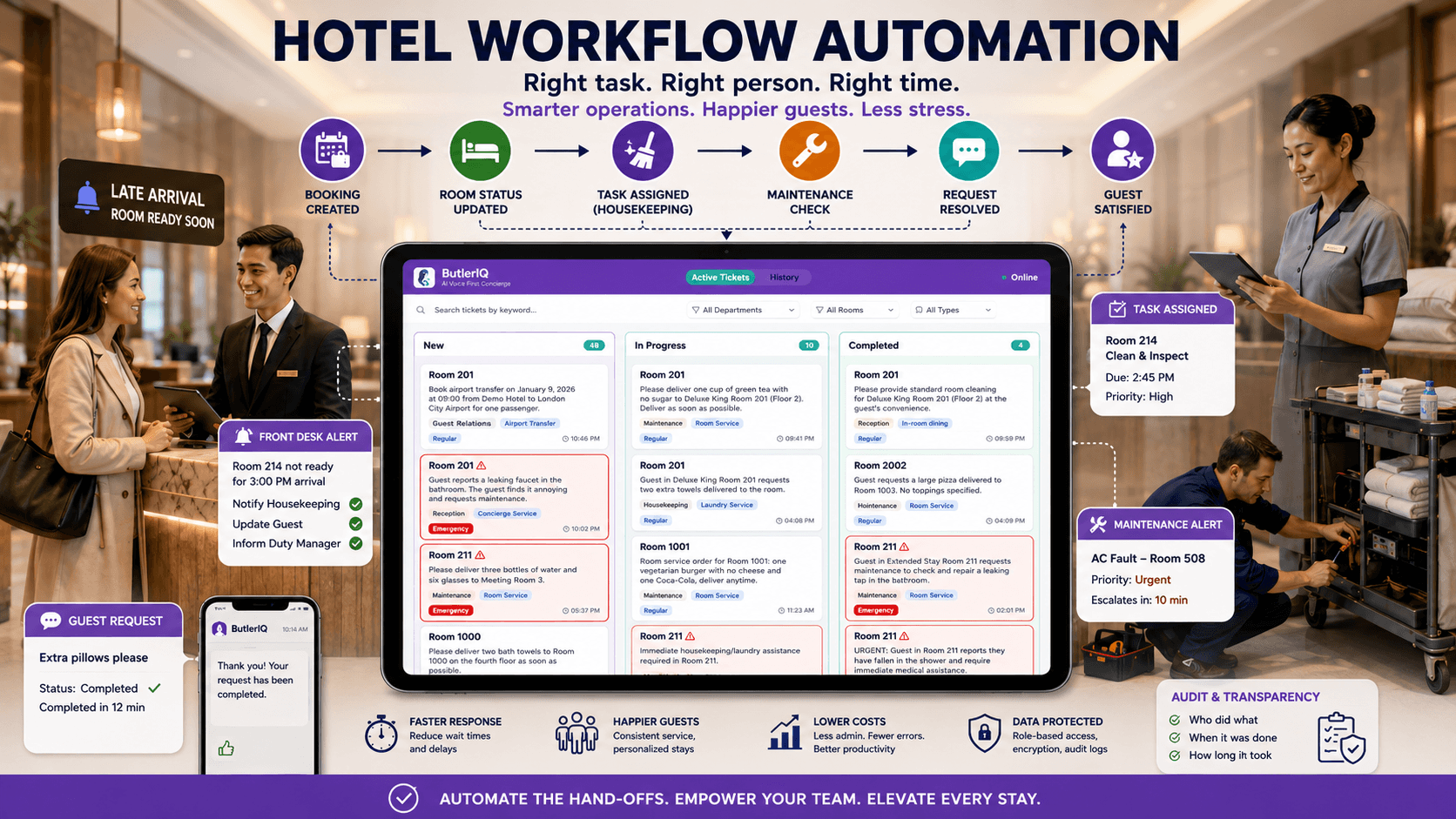
When your front desk logs a late arrival but housekeeping doesn't see it until the guest is standing in reception, the problem isn't effort, it's the workflow. Hotel workflow automation means you set clear rules for how tasks move between systems and teams, then software triggers the right actions at the right time. For example: a booking change in your PMS can automatically alert housekeeping, update the room status, and notify duty management if it risks a missed service level.
In practice, we're talking about routing tasks, approvals, and updates across departments like front office, housekeeping, maintenance, finance, and guest services. A common set-up is role-based queues (for example, "Late check-outs", "Maintenance urgent", "VIP amenities") with ownership, time limits, and escalation paths. That structure matters most in multi-property or multi-brand operations, where a consistent way of working reduces training time and makes performance comparable across hotels.
What it doesn't mean: replacing hospitality with robots or letting an algorithm make every decision. Automation should remove manual entry, repetitive chasing, and "who owns this?" confusion. It should not remove judgement calls like handling a complaint, deciding on a goodwill gesture, or reading the mood at check-in.
A useful test is this: if a task is predictable, frequent, and measurable (like sending pre-arrival details or assigning room cleans), it's a strong candidate for automation. If a task depends on nuance (like calming an upset guest), automation should only support it with context, templates, and fast escalation, not take over.
Where Automation Delivers The Biggest Wins Across The Guest Journey
The fastest wins show up where guests feel friction: waiting, repeating themselves, and getting different answers from different people. Automation helps when it removes a delay or prevents a mismatch between departments.
Pre-arrival: stop the "missing info" scramble
When pre-arrival comms are ad hoc, the team spends time answering the same questions, parking, check-in times, breakfast, accessibility, while guests feel uncertain. Automate confirmations, upsell prompts, and key instructions based on booking rules (rate type, length of stay, family booking, accessibility flags). A concrete example: send a message 72 hours before arrival asking for ETA and special requests, then route anything "non-standard" (cot, allergy, airport transfer) to the right queue.
If you're already investing in digital guest journeys, it helps to connect workflow triggers to the devices and channels guests actually use. For instance, voice or in-room devices can reduce calls for simple requests, but only if the request becomes a tracked task with ownership. (Related: how AI voice assistants are redefining hotel stays.)
Check-in and check-out: remove queues and prevent room errors
A busy arrival window exposes weak hand-offs. Automate alerts when a room is not ready close to arrival, trigger alternative actions (offer luggage storage, text when ready, prioritise a clean), and log what was promised. On departure, automate folio checks, late check-out approvals, and "charge dispute" workflows so finance does not rely on inbox hunting.
During the stay: keep housekeeping and maintenance in sync
Most service failures during the stay come from delays that no one sees early enough. If housekeeping marks a room "clean" but maintenance has an open ticket, or if a minibar issue sits in a notebook, the guest experiences inconsistency. Automation can link room status changes to maintenance checks, generate tasks when IoT sensors flag a fault, and escalate if an urgent ticket sits untouched for 30 minutes.
A practical pattern is "request → task → confirmation": the guest makes a request, the system assigns it, and the guest gets an update when it's accepted and completed. That single loop reduces repeat calls and protects the team from constant interruptions.
Post-stay: capture feedback while it still matters
When reviews and feedback sit in separate tools, issues repeat. Automate a feedback request based on stay type, then route negative feedback to a recovery queue within hours, not days. A good rule is to escalate anything under a certain rating (for example, 7/10) to a manager with the stay context attached.
Hotels that execute this well often see measurable upside. Industry commentary regularly links smoother operations to higher guest satisfaction, and some vendors cite 2–5% revenue uplift when operational delays fall and upsell follow-ups become consistent. The point isn't the exact percentage: it's that small operational improvements compound across hundreds of stays.
The Core Workflows To Automate First: A Practical Priority List
The quickest way to waste money on automation is to start with the fanciest feature instead of the messiest bottleneck. We get better results when we automate the workflows that cause repeat mistakes, guest complaints, and staff stress, then expand.
1) Guest check-in and check-out hand-offs
If check-in relies on verbal updates ("room 214 should be ready soon"), you will create queues and compensation costs. Automate:
room readiness alerts based on live housekeeping status
ID and payment prompts before arrival (where your process allows)
late check-out approval routing to duty management
automatic logging of promises (upgrade, amenity, timing)
2) Housekeeping assignment and status updates
Housekeeping is the heartbeat of the hotel, and manual boards break under pressure. Automate:
task assignment by zone, shift, and skills (for example, deep cleans)
"dirty to clean" status changes that notify front office
re-clean requests with photos and time stamps
If you want an example of how a staff-facing workflow can be made easier to run day-to-day, a dedicated dashboard can centralise tasks and remove the need for constant radio calls. See how a hotel staff dashboard supports real-time task management.
3) Maintenance triage with escalation
A leaking tap that sits for three hours becomes a refund. Automate:
priority rules (guest in-room vs vacant, safety vs cosmetic)
escalation if not accepted within a set time
parts ordering prompts for repeat faults
4) Approvals and audit tasks (night audit, finance, exceptions)
Approvals often live in email threads, which makes handover risky. Automate:
night audit checklists with completion evidence
comp and discount approvals with thresholds
exception reporting (voids, refunds, unusual POS activity)
5) Channel management and booking sync checks
Overbookings and rate parity errors are expensive and reputational. Automate:
alerts for inventory mismatches between PMS and channel manager
triggers when a high-value booking changes or cancels
"do we need to re-sell this?" tasks to revenue
6) Guest messaging and service recovery routing
When messages split across platforms, guests repeat themselves and staff miss context. Automate:
categorisation (extra towels, noise, room move, billing)
assignment to the right team with an SLA
manager escalation for repeat contacts or poor sentiment
This list is deliberately boring, and that's why it works. These workflows happen every day, they touch the guest experience directly, and they reduce manual work without asking your team to become IT experts.
Tool Stack Basics: PMS, Channel Manager, CRM, POS, And Integration Layers
A common failure mode looks like this: a hotel buys a shiny new tool, but the PMS still acts like the "source of truth", staff still copy-and-paste between screens, and nothing really changes. The fix is to treat your stack as a connected system with clear ownership of data.
PMS: the operational hub
Your Property Management System usually holds reservations, room status, guest profiles, and billing. That makes it the natural trigger point for many automations: arrival lists, room moves, late check-outs, and folio workflows. A concrete step we recommend is to document which PMS fields are reliable enough to trigger actions (for example, "VIP flag", "ETA", "company account"), then clean up inconsistent use before automating.
Channel manager: inventory and rate accuracy
Your channel manager protects you from manual updates across OTAs, but it also creates risk when mappings and rules drift. Automate daily checks for inventory mismatches, rate plan errors, and closed-to-arrival rules that don't match strategy. If a mismatch hits a threshold (for example, more than two rooms difference), trigger a task for revenue or reservations.
CRM: guest context and timing
A CRM helps you act on guest preferences without relying on memory. Automate:
pre-arrival messages based on segment (family, business, repeat)
post-stay follow-ups based on satisfaction signals
internal alerts when a high-value guest returns
POS: spend, errors, and dispute prevention
POS data drives spend reporting, but it also drives guest friction if it's messy. Automate exception reports for voids and refunds, and trigger a review workflow when a charge looks unusual (for example, duplicate items or out-of-hours comps). That keeps the process fair to both guest and team.
Integration layers: where automation actually becomes real
The best stack still fails if systems don't share data cleanly. You generally have three integration routes:
Native integrations (simpler, but limited)
No-code connectors (useful for quick wins and proofs of concept)
Middleware / integration platforms (best for scale, monitoring, and governance)
If you manage more than one property, integration monitoring becomes a day-to-day operational need. A central admin view helps you see what's connected, what failed, and what changed, before it becomes a guest issue. An admin console for hotel automation is one example of how teams manage those connections and permissions.
A final practical rule: define one "system of record" for each data type (guest identity, reservation, room status, payments). When two tools both think they own the truth, the team ends up doing manual reconciliation, exactly what automation should remove.
Automation Design Principles: Standardise, Trigger, Escalate, And Audit
Automation goes wrong when it simply speeds up chaos. If your team already argues about who owns a guest request, automating it without rules just creates faster confusion. We get better outcomes when we design automation like an operating model, not a gadget.
Standardise: one way of working, by role
Start with standard work by role: front office agent, housekeeping supervisor, duty manager, maintenance lead, finance. For each role, define:
what "done" means (example: "room clean" includes minibar check)
required evidence (photo, note, time stamp)
handover rules at shift change
A practical step is to build a short playbook for your top 20 tasks. If two properties use different words for the same status ("inspected" vs "checked"), you'll never get clean reporting.
Trigger: use events the hotel already produces
Triggers should come from real operational events, not from someone remembering to click a button. Strong triggers include:
booking created, modified, cancelled
guest checked in / checked out
room status changed
maintenance ticket opened or re-opened
message received on a guest channel
Example: when a guest extends a stay, trigger a housekeeping reschedule, a rate verification task for revenue (if needed), and a key re-encode reminder.
Escalate: protect service levels automatically
Escalation is where workflow automation earns its keep. Define SLAs by task type and urgency, then escalate when time passes without action. For instance:
towels request: escalate after 15 minutes to housekeeping supervisor
in-room fault: escalate after 10 minutes to maintenance lead
noise complaint: escalate immediately to duty manager
That approach reduces "I thought someone else had it" moments, which is where service quality quietly drops.
Audit: create visibility without micromanaging
Audit trails help in three ways: guest disputes, staff fairness, and continuous improvement. Build audit into the workflow so you can answer questions like:
Who accepted the task, and when?
How long did it take end-to-end?
How often did we breach our SLA?
The key is to use audits to improve the process, not to punish the team. A monthly review that highlights the top three recurring failure points (for example, late room readiness on Saturdays) gives you a concrete improvement plan instead of vague frustration.
When we apply these principles, we don't just move faster, we reduce risk, protect standards, and make the operation easier to run on a busy weekend.
Data, Privacy, And Security: Keeping Guest Information Safe And Compliant
A single mis-sent confirmation email or a staff member seeing data they shouldn't can damage trust faster than any slow check-in. Hotels handle passports, payment details, stay patterns, and sometimes sensitive accessibility needs, so workflow automation has to be built around privacy rather than added afterwards.
Map the data before you connect tools
Before integrating anything, list what data moves where: guest name, contact details, reservation ID, preferences, payment tokens, and message content. A concrete step is to create a "data flow sheet" for each workflow (for example, "pre-arrival messaging") that names the source system, the destination system, and the field-level data shared.
Apply role-based access as a default
Not everyone needs to see everything. Set permissions by role so, for example:
housekeeping sees room tasks and limited notes, not full guest profiles
finance sees billing and disputes, not guest medical notes
managers have oversight access with auditing
This reduces accidental exposure and supports cleaner operations when staff rotate.
Encrypt, log, and monitor
Security basics matter more once automation increases speed and volume:
encrypt data in transit and at rest where possible
use audit logs for data access and workflow actions
monitor integration failures so data does not "fall between systems"
A practical example: if a connector fails and stops sending "room ready" updates, you want an alert within minutes, not a guest complaint at the desk.
Stay GDPR-ready in daily operations
GDPR compliance is not only a legal issue: it's operational discipline. Automate:
data retention rules (when to delete or anonymise)
subject access request routing (so requests do not languish)
consent management for marketing follow-ups
Finally, treat third-party tools as part of your risk surface. Review vendor security claims, confirm where data is processed, and ensure contracts cover responsibilities clearly. In hospitality, trust is part of the product, so protecting guest data is not optional admin, it is service quality.
Change Management: Getting Staff Buy-In Without Losing Service Quality
If staff think automation is there to monitor them or cut hours, they will work around it, and the guest will feel the cracks. We get buy-in when the first changes remove pain that staff already complain about, like repeated calls, missing handovers, and constant interruptions.
Start with one problem the team recognises
Pick a workflow with visible stress, such as "room readiness at peak check-in". Run a short pilot where the goal is clear: fewer desk confrontations, fewer radio calls, fewer last-minute room moves. When staff see that automation protects them from chaos, adoption stops being a fight.
Involve supervisors as designers, not just trainees
Housekeeping supervisors and duty managers know where the real bottlenecks are. Ask them to help define:
task categories and priorities
what counts as "done"
escalation rules
A concrete step: run a 60-minute workshop and capture the top 10 "handover failures" from the last month, then automate just those.
Train for moments, not features
Training fails when it becomes a tool tour. Train by scenario:
"Guest asks for extra pillows at 22:00"
"Maintenance ticket re-opens twice"
"VIP arrival room not ready"
Each scenario should show where the task lands, how long it should take, and what happens if it's late.
Protect the human touch deliberately
Automation should create time for hospitality, not replace it. Set a simple rule: any guest-facing message that deals with disappointment (delay, fault, complaint) should include a human check or a manager-approved template. The team can still use automation to log, route, and track, but the tone stays personal.
Keep a feedback loop for the team
Staff will spot issues quickly, like duplicate tasks or unclear statuses. Create a weekly 15-minute review where the team reports:
one automation that helped
one that caused confusion
one change request
This prevents quiet workarounds, and it signals respect for the people doing the work. In hospitality, that respect shows up in service quality just as much as any piece of software.
Measuring ROI: The Metrics That Prove Automation Is Working
Automation can feel successful because it looks modern, but owners and GMs need proof. We get proof by measuring time, quality, and guest outcomes in the same view, because a cheap labour saving that lowers guest satisfaction is not a win.
Time and throughput: where admin actually drops
Start with simple operational measures:
average time to accept and complete tasks (by type)
number of manual entries reduced (for example, copied notes, re-typed requests)
shift handover time and number of open tasks at handover
In well-chosen workflows, hotels often see task completion times drop dramatically because staff stop chasing information. A practical goal is a 50–80% reduction for repetitive, clearly defined tasks like basic requests and status updates.
Quality: fewer errors, fewer escalations
Track:
re-opened maintenance tickets
housekeeping re-cleans per 100 departures
billing corrections and charge disputes
missed SLA counts (and the reason codes)
Concrete example: if "extra towels" keeps breaching SLA on Saturdays, you can adjust staffing or stock placement rather than blaming individuals.
Guest experience: leading indicators and outcomes
Tie operational improvements to guest outcomes:
queue time at check-in (or number of "room not ready" incidents)
service request satisfaction (quick post-resolution rating)
review scores related to cleanliness, responsiveness, and staff helpfulness
Net Promoter Score (where used)
To keep it real, we recommend a "guest pain metric" alongside financial metrics. For instance, count how many guests had to contact the desk twice for the same issue, because repetition is a reliable predictor of poor reviews.
Financial outcomes: revenue and labour impact
Measure:
labour hours spent on admin tasks (before/after)
RevPAR and upsell conversion rates (where automation supports consistent offers)
refunds, comps, and goodwill credits linked to operational failures
Some providers cite 2–5% revenue uplift when automation reduces friction and improves consistency. Whether your number is smaller or larger, the disciplined approach is the same: pick a baseline, run a pilot, measure weekly, and only scale what genuinely improves both the team experience and the guest experience.
Implementation Roadmap: A 30-60-90 Day Plan For Hotels Of Any Size
The risk in implementation is not the tech, it's trying to change everything at once, then discovering the data is messy and the team is confused. A 30-60-90 plan keeps momentum while protecting service standards.
Days 1–30: choose one workflow and make it work end-to-end
Pick a high-impact workflow (often housekeeping status → front desk readiness). Then:
map the current steps with real examples from the last week
define owners, SLAs, and escalation rules
clean up the minimum viable data fields in the PMS
run a pilot with one shift or one floor
A concrete deliverable by day 30 is a working dashboard where staff can see tasks, status, and overdue items without switching between WhatsApp, email, and radios.
Days 31–60: connect systems and standardise across departments
Once the pilot works, expand carefully:
integrate channel manager alerts and key reservation triggers
add maintenance triage and re-open rules
standardise task categories and naming conventions
train by scenario, not by feature list
By day 60, you want consistent adoption from supervisors, because they will set the tone for the rest of the team.
Days 61–90: audit, optimise, and scale
Now you make it sustainable:
review SLA breaches and fix root causes (stock, staffing, unclear "done")
add audit views for managers (not micromanagement, just visibility)
roll out to more departments or properties with the same templates
lock down permissions and data retention rules
A practical step in this phase is to create a monthly "ops health" report that shows task volume, completion times, guest pain metrics, and the top three recurring bottlenecks.
This approach works for small independent hotels and larger groups because it focuses on repeatable workflows and clean standards. Once you have one solid automation loop, the next ones become faster to deploy and easier for the team to trust.
Conclusion
When we carry out hotel workflow automation well, we don't turn the hotel into a machine, we remove the busywork that keeps great staff from doing great service. The most reliable gains come from automating hand-offs: room readiness, housekeeping and maintenance coordination, approvals, and service request routing. If we standardise first, use sensible triggers, escalate early, and audit fairly, we cut admin time and lift guest scores without losing the human touch. The smart move for 2026 is to start small, measure honestly, and scale only what makes the team's day easier and the guest's stay smoother.
Hotel Workflow Automation FAQs
What is hotel workflow automation and how does it improve operations?
Hotel workflow automation uses software to set clear rules for task hand-offs between departments, ensuring work moves seamlessly without manual chasing. It reduces errors, cuts admin time, and enables staff to focus on guest service, improving overall efficiency and satisfaction.
Which hotel workflows should be automated first for the biggest impact?
Start with guest check-in and check-out hand-offs, housekeeping assignment and status updates, maintenance triage with escalation, approvals like night audits, and channel management syncs. These address frequent bottlenecks causing delays, mistakes, and guest complaints.
How does automation enhance the guest experience during their stay?
Automation synchronises housekeeping and maintenance tasks, triggers alerts for room readiness, and confirms service requests promptly. This ‘request → task → confirmation’ loop reduces waits, repeat calls, and inconsistencies, ensuring smoother, more personalised guest interactions.
What technology systems are essential for effective hotel workflow automation?
Key tools include the Property Management System (PMS) as the operational hub, channel managers for inventory accuracy, CRM for guest profiles and messaging, POS for billing, plus integration platforms (native, no-code, or middleware) to connect these systems seamlessly for real-time data flow.
How can hotels ensure data privacy and GDPR compliance in workflow automation?
Hotels should map data flows between systems, apply role-based access controls, encrypt data, monitor integration failures, and automate data retention and consent management processes. This protects sensitive guest information and maintains trust while streamlining operations.
What are best practices for gaining staff buy-in when implementing workflow automation?
Begin by solving a clear pain point visible to staff, involve supervisors in designing workflows and escalation rules, provide scenario-based training, protect the human touch in guest communications, and establish ongoing feedback loops to refine automation and maintain service quality.
Sep 25, 2026
Hospitality Innovation
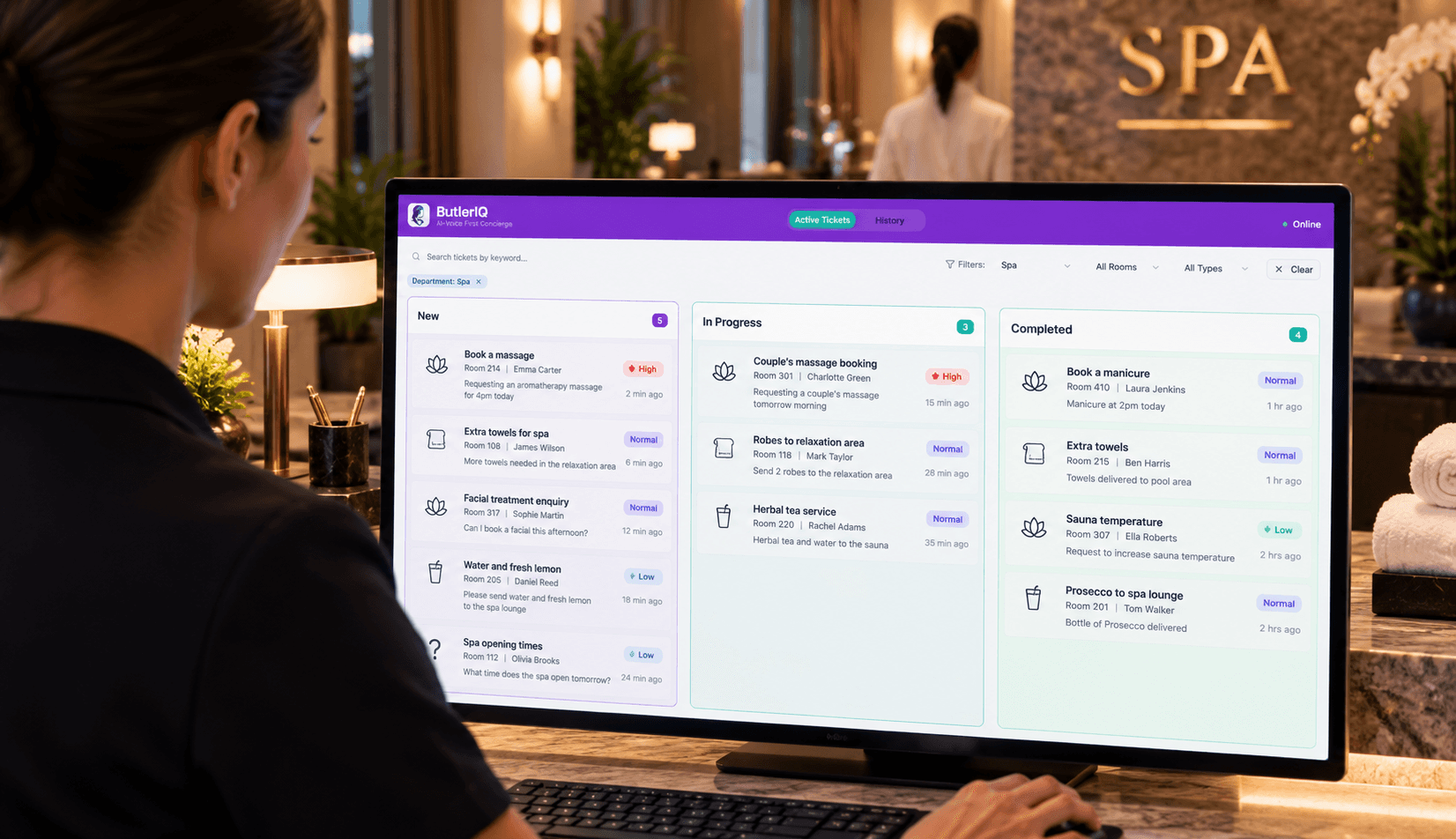
Guest Request Routing for Hotels in 2026: Cut Front Desk Workload Without Adding Headcount
Manual guest requests quietly eat hours of front desk time every week. See how automatic request routing works, what it saves your team, and how to evaluate it for your property.

Sep 15, 2026
Hotel Upselling Solutions: Why Pre-Arrival Isn't Enough
Hotel upselling doesn't require aggressive sales tactics—it requires smart timing and conversational delivery. Learn how modern hotels use voice-first AI and personalised offers to increase ancillary revenue by £15–£30 per stay while keeping guests feeling genuinely helped, not pressured. This guide covers proven upselling strategies, multilingual AI integration, and weekly KPI tracking for UK SME properties

Aug 14, 2026
Smart Hotel Rooms: Why the First Wave Failed, and What the Next One Looks Like
Smart hotel rooms promised a lot and delivered little. Here's what changed, what a genuinely smart room does in 2026, and how UK operators should approach it.
