Front Desk Hotel Software in 2026: Choose Right, Avoid Pain
Discover how front desk hotel software streamlines check-in, reservations, and payments in 2026, improving guest experience with real-time management and smart integrations.
A busy Friday check-in can unravel fast: one late room, one card decline, one double-booked reservation, and suddenly your team is firefighting in front of tired guests. The right front desk hotel software stops those small failures from stacking up by putting rooms, reservations, payments, and guest notes in one place. In 2026, the difference between "it works" and "it helps" comes down to workflows, integrations, and how quickly staff can learn it. Here's how we choose well, avoid expensive traps, and get everyone up to speed without derailing service.
Key Takeaways
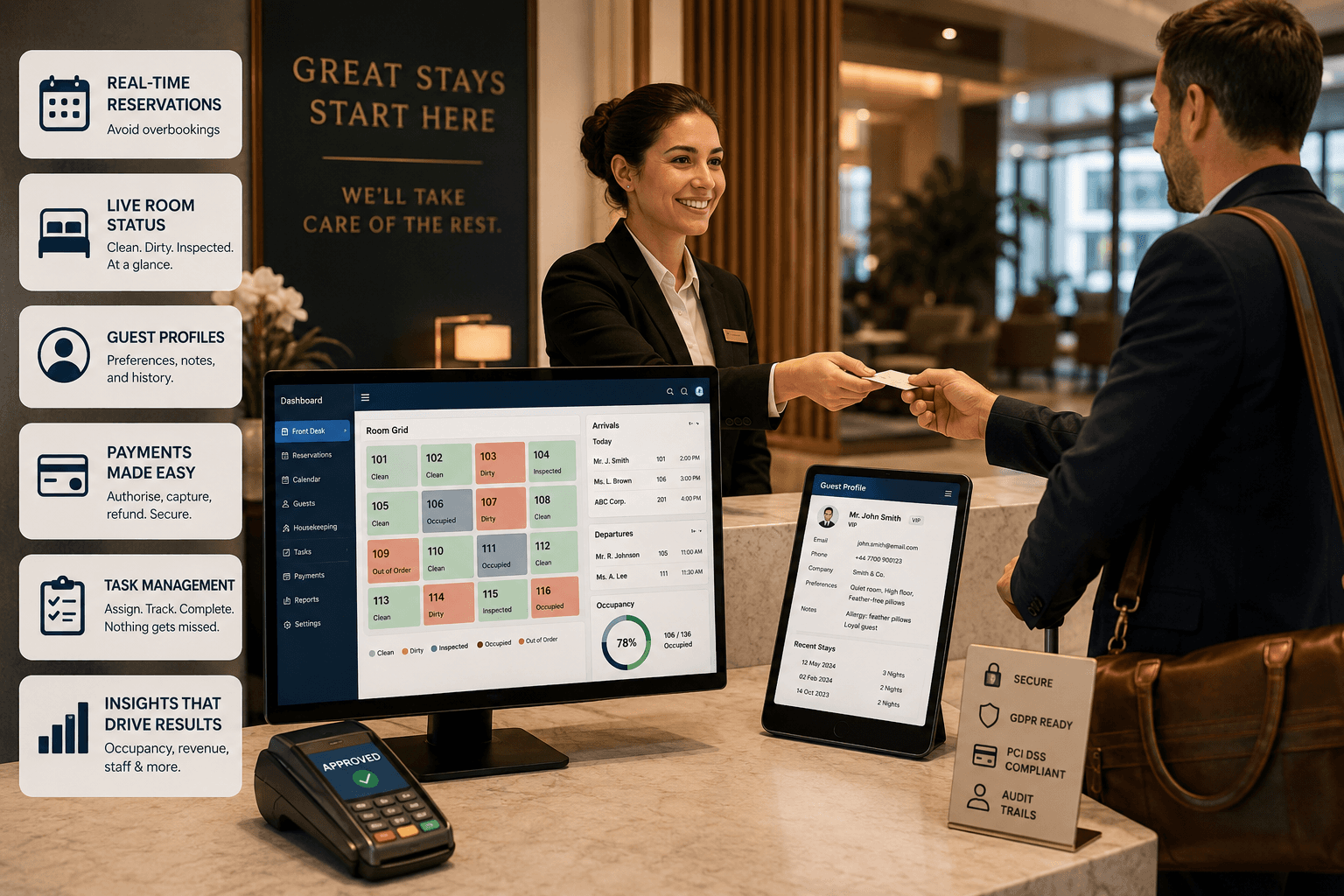
Front desk hotel software centralises reservations, payments, and guest information to streamline check-in and improve the guest experience.
Effective software must feature real-time booking updates, intuitive room management, comprehensive guest profiles, and integrated task communication to prevent errors and delays.
Smooth arrival-to-departure workflows, including pre-arrival guest messaging and fast payment processing, reduce queues and enhance satisfaction.
Robust integrations with PMS, channel managers, POS, and door locks are essential to maintain data accuracy and operational efficiency.
Choosing between cloud and on-premise solutions should consider security, connectivity risks, and total cost of ownership beyond licence fees.
A successful implementation requires thorough data migration, clear workflow definitions, targeted staff training, and timing go-live to minimise disruption.
What Front Desk Hotel Software Actually Does (And Why It Matters To Guests)
When reception runs on sticky notes, spreadsheets, or half-connected systems, the guest feels it immediately: longer queues, wrong room keys, missed wake-up calls, and the awkward "can you wait a moment?" while staff hunt for information. Front desk hotel software fixes that by turning the front office into a single, live control panel for the stay.
At its simplest, the software centralises reservations, room status, guest profiles, and payments so staff can act in seconds. A receptionist can pull up a booking, confirm ID, take a pre-authorisation, assign a room, and send check-in details without switching tabs five times. That speed is not just convenience: it changes the guest experience because the first five minutes on-site often set the emotional tone for the whole stay.
The best systems also support "invisible" work that guests benefit from even when they never see it. For example, a front desk agent can add a note like "allergy: feather pillows" or "quiet room preferred," and the system carries it forward to future stays. Or the software can trigger an automated pre-arrival message that asks for an ETA, which helps the team plan room turns and reduce waiting.
In 2026, we should think of front desk software as a guest-flow tool, not a screen behind a counter. If it helps staff keep promises, ready rooms, correct rates, accurate bills, it earns trust. If it creates extra clicks and workarounds, guests pay the price in delays and mistakes.
The Core Features That Make Or Break Day-To-Day Operations
A lot of properties buy on the demo and then discover the day-to-day reality: the calendar is clunky, notes don't surface at the right time, and staff quietly return to paper. The difference between "we have software" and "we run smoothly" usually comes down to a handful of features that either reduce pressure or add to it.
Reservations and booking control (the anti-overbooking layer)
Overbookings rarely happen because someone is careless: they happen because availability updates lag across channels. We want real-time reservation management with a clear audit trail: who changed dates, who moved a room, who overrode a restriction. A practical test is to simulate a busy moment: take a phone booking while an OTA booking lands, then adjust dates and add an extra night. If availability doesn't update instantly and visibly, we're buying future headaches.
Rooms and status at a glance
On a Saturday turnaround, the team needs a live view of room status (dirty, clean, inspected, out of order) that updates without side conversations. Drag-and-drop room moves are useful, but only if the system also updates keys, housekeeping tasks, and guest messages. We should look for quick actions like "extend stay," "change room," "late checkout," and "add charge" directly from the room grid, because staff won't click through five screens when there's a queue.
Guest profiles that actually help service
A guest profile should store more than a name and email. We want fields that staff will use: preferences, incident notes (handled sensitively), company details for invoicing, and stay history. A concrete example: if a repeat corporate guest always needs a VAT invoice and a quiet room away from the lift, the system should surface that at check-in, not bury it in a notes tab.
Tasking and internal communication
If reception relies on verbal messages to housekeeping or maintenance, work gets lost. Built-in tasking, "fix TV in 214," "cot requested for 307," "amenity top-up for VIP arrival", prevents missed promises. The key is visibility: tasks should show status, owner, and time stamps so a duty manager can see bottlenecks at 6pm.
Usability and speed (the make-or-break factor)
We can have the richest feature set in the world and still fail if the interface feels like an accounting tool from 2008. In practical terms, we should time common actions:
Create a walk-in booking with payment.
Move a guest to another room.
Split a folio for company billing.
Refund a deposit.
If each task takes longer than it should, staff will slow down, errors will rise, and guest experience will suffer.
Check-In, Check-Out, And Payments: Designing A Smooth Arrival-to-Departure Flow
Nothing tests a front desk like arrivals at the same time as phone calls, last-minute booking changes, and a guest who insists they already paid. If the flow is not designed end-to-end, from pre-arrival to receipt, it turns into manual patching and apologising. We should design the process around the moments that cause friction: identity checks, authorisations, extras, and the final bill.
Pre-arrival: reduce surprises before the guest reaches the desk
A simple pre-arrival workflow can remove most check-in delays. We can ask guests to confirm arrival time, add vehicle registration for parking, and choose add-ons like breakfast or late checkout. Even if we don't go fully "contactless," collecting details early means the receptionist spends time welcoming, not typing.
A practical approach is to set up an automated message 24–48 hours before arrival that requests:
ETA window
ID requirements (kept clear and legal)
card pre-authorisation notice
special requests (cot, accessible room, dietary needs)
The payoff is concrete: fewer room moves, fewer "we didn't know" moments, and faster room assignment.
Check-in: make exceptions easy, not painful
Check-in looks simple until we hit edge cases: early arrivals, partial payments, room upgrades, and group bookings. Good front desk hotel software keeps the core steps short, confirm details, authorise payment, issue keys, while giving staff quick tools for exceptions.
We should look for:
ID capture or verification options that don't create GDPR risk
clear flags for deposits, outstanding balances, and rate rules
one-click upgrade and upsell posting (e.g., parking, breakfast, pet fee)
automatic room assignment rules that still allow easy overrides
A real-world example: if a guest arrives early and the assigned room is still dirty, the agent should be able to swap rooms, reissue keys, and notify housekeeping in under a minute.
Payments: fewer disputes start with better payment handling
Payment pain usually shows up as disputes, chargebacks, and "why is there a hold on my card?" confusion. We want payment tools that handle:
pre-authorisations and incremental authorisations
split payments (card + voucher + cash)
refunds tied to the original transaction
digital receipts and itemised invoices
Clarity matters. A system that prints or emails a clean, itemised folio reduces front office arguments and protects the property when a guest challenges charges later.
Check-out: remove the queue without losing control
Fast check-out is a win only if the final bill is correct. The software should support express check-out (email receipt, no desk visit) while still enforcing controls like pending minibar posts or late charges. A simple workflow is to set a cut-off time for posting extras, then auto-notify the guest with the final amount and receipt.
If we get this right, we reduce waiting, improve guest satisfaction, and free the team to handle the complex cases that truly need a human conversation.
How It Connects To PMS, Channel Managers, POS, And Door Locks
A front desk system that doesn't connect properly creates a very specific kind of stress: staff lose trust in the numbers. They start checking three screens "just to be sure," and that slows service for every guest. Integration is not a nice-to-have: it's how we prevent double work and costly mistakes.
PMS: one source of truth for rooms, rates, and guest data
In many setups, front desk functionality sits inside a property management system (PMS), or it feeds into one. Either way, we need clear ownership of data: where do rates live, where does availability update, and where are guest profiles stored? A common failure is duplicated profiles, "J. Smith" and "John Smith", which breaks personalisation and makes reporting messy.
A practical test: change a room to "out of order" and see whether availability updates everywhere it should, including the booking engine and OTA channels.
Channel manager: stop overbookings and rate mismatches
If we sell rooms on OTAs, we need a channel manager that syncs availability and rates in real time. The most painful scenario is a rate mismatch that triggers guest arguments at the desk. We should confirm the integration supports:
instant inventory updates
rate plans and restrictions (min stay, closed to arrival)
mapping for room types and occupancy rules
We also want clear error reporting. If a channel fails to update, the system should flag it loudly rather than quietly logging it somewhere no one checks.
POS: charge posting that doesn't create billing chaos
Restaurant, bar, spa, and parking charges can break check-out if they post late or post to the wrong room. A good POS integration pushes charges to the right folio with references (date, outlet, server, receipt number). A concrete safeguard is requiring a room number plus guest surname at the till, then verifying it against in-house guests.
Door locks and digital keys: convenience with operational discipline
Lock integration sounds glamorous until it fails at 10pm. We should confirm:
key encoding works even if the internet drops (where relevant)
lost key workflows are quick
room changes automatically invalidate old keys
time-based permissions support late check-out or early access when approved
If we plan to add mobile keys, we need to align it with guest identity checks and local policy. Convenience is great, but security and auditability matter more.
Booking engine and direct booking: keep control of your margin
Direct booking matters because it reduces commission and gives us better guest data. If the front desk software connects cleanly to a booking engine, we can present accurate availability and take payments without manual reconciliation. The practical win is fewer "ghost bookings" and fewer calls to confirm what the website just sold.
The guiding principle is simple: every integration should remove a manual step. If it creates a workaround, it's not an integration, it's a liability.
Cloud Vs On-Premise: Security, Reliability, And Total Cost Of Ownership
The quickest way to regret a software decision is to underestimate the cost of keeping it running. Cloud and on-premise can both work, but they fail in different ways. We should decide based on real operational risks: downtime, data protection, support response, and long-term cost.
Cloud: faster updates, easier access, but you must plan for outages
Cloud systems usually win on speed of deployment and ongoing improvements. Vendors push updates, add features, and fix bugs without us scheduling server maintenance. For multi-site operators, cloud access also makes life easier because managers can view performance and room status from anywhere.
The risk is dependency on connectivity. Even with great broadband, outages happen. We should ask exactly what the system does when the internet drops:
Can we still check guests in?
Can we still encode keys?
Can we still take payments (or at least record them safely)?
A sensible mitigation is a documented "offline mode" procedure and a backup connection (for example, a secondary line or 4G/5G failover) tested during a quiet period.
On-premise: local control, but maintenance becomes your problem
On-premise setups can appeal when a property wants tight control over infrastructure or has challenging connectivity. The trade-off is clear: we become responsible for servers, backups, security patching, hardware replacement, and often more complex upgrades. If the one person who understands the server leaves, we inherit a risk that doesn't show up on the quote.
Security: focus on roles, logging, and payment scope
Security is not just "is it cloud?" or "is it local?" It's whether the system supports strong access control and accountability. We should insist on:
role-based permissions (new starter vs manager vs finance)
multi-factor authentication for admin users
detailed logs for rate overrides, refunds, and guest data changes
clear data retention settings
For payments, we also need to understand scope: does the vendor handle card data via tokenisation, or does sensitive data touch our network? The less card data we handle, the simpler PCI compliance becomes.
Total cost of ownership: look beyond licence price
A cheaper monthly fee can still cost more if it requires extra tools, manual reconciliation, or more staff hours. When we compare options, we should cost:
licences and modules (front office, housekeeping, reporting, payments)
implementation and training
integration fees (POS, locks, channel manager)
support tiers and out-of-hours support
hardware (kiosks, tablets, key encoders)
If we price it properly, the "best value" choice often looks different from the headline subscription.
Choosing The Right Fit For Your Property Type And Team
A tool that works brilliantly for a 250-room city hotel can be the wrong fit for a 12-room boutique property, and vice versa. The pain shows up quickly: staff avoid the system, reporting becomes unreliable, and managers spend evenings fixing data. Choosing the right front desk hotel software starts with an honest view of how we operate.
Property type: match complexity to reality
We should map our operation to one of these realities:
Small property (B&B, small boutique): speed, simplicity, and clean reservation management matter more than deep configuration. A clear calendar, basic housekeeping status, and straightforward payments often beat advanced features no one uses.
Mid-size hotel: we usually need stronger housekeeping workflows, group booking handling, corporate accounts, and robust reporting.
Multi-property or serviced apartments: we need standardised processes, central oversight, and strong integrations, especially for channel management and rate consistency.
A concrete example: serviced apartments often need deposits, pre-arrival messaging, and self check-in support. A system that assumes traditional reception hours can create constant workarounds.
Team reality: turnover, training time, and shift handovers
Front desk teams change. Seasonal staff join. Night auditors cover weekends. The software has to be learnable. We should test with real users, not just managers, and ask them to complete tasks from a script:
take a phone booking
move a booking to a different date
post a minibar charge
create a refund
If they struggle, that struggle will show up in guest queues.
Shift handovers are another make-or-break detail. We want an easy way to record and surface:
outstanding guest issues
rooms not ready
expected arrivals and VIP notes
pending payments or authorisations
Support and vendor behaviour: the hidden differentiator
When something breaks at 9pm, the guest does not care about our contract. They want a room key that works and a bill that makes sense. We should ask for:
support hours and response times (and what "urgent" means)
a named onboarding contact
a knowledge base with screenshots, not just generic articles
release notes that explain changes in plain language
If the vendor can't explain their system clearly in sales, they won't be clearer when we're under pressure.
A buying mindset that fits our brand values
Our site values relationship-led, straightforward guidance over transactional selling. We should apply the same lens here: choose a vendor that will act like a long-term partner, not a one-off supplier. The best software choice is the one that makes staff calmer, decisions clearer, and guest service more consistent, week after week.
Implementation Plan: Data Migration, Training, And Go-Live Without Chaos
Most software projects fail in the messy middle: the data import is rushed, staff training is squeezed, and go-live lands on a peak weekend. The cost is real, lost reservations, wrong rates, unhappy guests, and stressed staff. A calm implementation is not luck: it's a plan with clear ownership.
Step 1: Define what "done" looks like (before anyone touches data)
We should start with a short success checklist that is specific:
reservations import correctly with rate plans and payment status
room types and physical rooms match reality
taxes, fees, and policies apply correctly
at least one end-to-end payment test passes (authorise, capture, refund)
staff can complete the top 10 daily tasks without help
If we don't define this, we end up arguing about "nearly ready" while guests arrive.
Step 2: Data migration that prioritises accuracy over volume
Migration is where subtle errors hide. We should decide what to move and what to start fresh:
Move: future reservations, deposits, key guest notes, corporate accounts.
Consider starting fresh: old leads, outdated profiles, messy duplicate guest records.
We should run a sample import first, say 50 reservations across different scenarios (OTA booking, direct booking, group, corporate, prepaid, pay on arrival). Then we check them manually for:
correct dates and room types
correct rate and taxes
correct guest contact details
correct payment status
Step 3: Build workflows, not just settings
A system can be configured perfectly and still fail if workflows are unclear. We should document, in plain English, how we will handle:
early check-in and late check-out approvals
deposits and damage pre-authorisations
no-shows and cancellations
room moves and key reissues
refunds and disputes
Each workflow needs an owner (front office manager, duty manager, finance) so staff know who decides.
Step 4: Training that respects how adults learn at work
Training fails when it is too long, too generic, or too theoretical. We should train in short, role-based sessions with real scenarios:
Reception: check-in, room moves, payments, guest notes.
Night audit: day closure, corrections, reports.
Managers: overrides, reporting, user access.
Then we run a "mock shift" for 60–90 minutes: one person plays a guest, one plays housekeeping, and the team processes arrivals, changes, and check-outs. It sounds simple, but it reveals the gaps quickly.
Step 5: Go-live planning that protects service
We should avoid go-live on a bank holiday weekend or a major local event. If we can't, we reduce scope: keep processes simple for the first two weeks and delay optional features like kiosks or advanced upsell flows.
A sensible go-live checklist includes:
printed emergency procedures for internet outage
vendor support confirmed for the first 48 hours
a rollback plan for critical failures
extra staffing at peak arrival times
The goal is not perfection on day one. The goal is stable operations while staff build confidence.
Front Desk Reporting: Occupancy, Revenue, And Operational Insights You’ll Actually Use
Reporting often looks impressive in demos and then gathers dust because it doesn't answer real questions fast enough. The risk is that we manage by gut feel while costs creep up: overtime rises, rooms turn late, and we miss patterns in booking behaviour. Good reporting makes issues visible early, while there's still time to fix them.
Daily operational reports that reduce today's chaos
We should prioritise a small set of reports that help us run the day:
Arrivals and departures list with payment status and special requests.
In-house guest list with balances, deposits, and key notes.
Housekeeping status showing clean/dirty/inspected and late-room alerts.
Exceptions report: overbook risk, unassigned rooms, failed payments.
A concrete habit that works: review exceptions at 9am and 3pm, then assign fixes to named people. That one routine can cut the number of last-minute front desk fires.
Revenue and booking insights that guide decisions
For managers, we want clarity on where bookings come from and what they're worth:
occupancy and ADR trends by day/week
channel mix (direct booking vs OTA) and commission impact
cancellation and no-show rates
upsell performance (late checkout, breakfast, parking)
If direct booking is slipping, we can respond with practical steps: tighten rate parity, improve booking engine visibility, or introduce small-value add-ons that convert without discounting.
Staff and process insights (because labour is your biggest cost)
Front office reporting should also show operational friction:
average check-in time (where measured)
number of room moves per day
late rooms and their causes (housekeeping capacity vs maintenance delays)
refund frequency and common reasons
If we see frequent room moves for "noise complaints," that's not a front desk problem: it's a room allocation and product issue. Reporting helps us stop treating symptoms.
Accessibility, Compliance, And Risk Controls: GDPR, PCI DSS, And Audit Trails
One data incident can wipe out months of trust. Front desk software holds personal data (names, contact details, IDs in some cases) and payment-related information, so compliance is not optional.
For GDPR, we should confirm the system supports:
lawful basis notes and configurable data fields (so we don't collect what we don't need)
retention rules (auto-delete or anonymise after a set period)
subject access requests (export a guest's data quickly)
consent management for marketing messages
For PCI DSS, we should push card handling towards tokenised payments and avoid storing card details in free-text notes. A simple control is to restrict who can process refunds or key-enter cards, and to require manager approval for high-risk actions.
For audit trails, we want time-stamped logs for:
rate overrides and discounts
refunds and voids
guest data edits
room moves and key reissues
If a dispute lands weeks later, an audit trail turns guesswork into evidence.
Conclusion: A Practical Checklist For Selecting Front Desk Hotel Software With Confidence
When we choose front desk hotel software in 2026, we're really choosing how calm (or chaotic) reception feels on the busiest day of the year. Before we commit, we can keep it simple with a practical checklist: confirm the core workflows are fast (check-in, room moves, refunds), validate real-time integration with PMS/channel manager/POS/locks, and test payments end-to-end with receipts and audit logs. Then we pressure-test security (roles, MFA, GDPR controls, tokenised payments) and cost the full picture, not just the licence.
Finally, we treat implementation like guest service: plan it, rehearse it, staff it properly, and go live when the property can breathe. If the system helps staff keep promises consistently, guests will feel the difference within minutes of arrival.
Frequently Asked Questions about Front Desk Hotel Software
What is front desk hotel software and how does it improve guest experience?
Front desk hotel software centralises reservations, room status, guest profiles, and payments, allowing staff to manage check-ins efficiently, reduce errors, and personalise service, which leads to faster arrivals and a smoother stay experience.
Which core features should I look for in front desk hotel software?
Key features include real-time reservation management, live room status updates, detailed guest profiles with preferences, integrated payment processing, task management for internal communication, and intuitive usability to ensure staff can work quickly and accurately.
How does front desk software integrate with other hotel systems like PMS and channel managers?
It synchronises in real-time with PMS for central guest data and room availability, connects to channel managers to avoid overbookings and rate mismatches, integrates with POS systems for accurate billing, and links to digital door locks for seamless guest access and security.
What are the benefits of cloud-based front desk software compared to on-premise?
Cloud-based systems offer faster deployment, ongoing updates, and remote access for multi-site management, while requiring internet connectivity. On-premise gives local control but demands more maintenance and IT resources. Planning for connectivity outages is essential with cloud setups.
How can front desk hotel software support smooth check-in and check-out processes?
By automating pre-arrival communications for ETA and requests, enabling quick identity and payment authorisations, supporting room assignment and upgrades seamlessly, and offering contactless or express check-out options, the software shortens queues and reduces errors during guest arrivals and departures.
What factors should I consider to choose the right front desk software for my hotel?
Consider your property size and complexity, ease of use for staff, strength of OTA integration, quality of support, reporting capabilities, scalability, and how well the software integrates with existing systems to ensure it matches daily operational needs and growth plans.
Sep 25, 2026
Hospitality Innovation
Guest Request Routing for Hotels in 2026: Cut Front Desk Workload Without Adding Headcount
Manual guest requests quietly eat hours of front desk time every week. See how automatic request routing works, what it saves your team, and how to evaluate it for your property.

Sep 15, 2026
Hotel Upselling Solutions: Why Pre-Arrival Isn't Enough
Hotel upselling doesn't require aggressive sales tactics—it requires smart timing and conversational delivery. Learn how modern hotels use voice-first AI and personalised offers to increase ancillary revenue by £15–£30 per stay while keeping guests feeling genuinely helped, not pressured. This guide covers proven upselling strategies, multilingual AI integration, and weekly KPI tracking for UK SME properties

Aug 14, 2026
Smart Hotel Rooms: Why the First Wave Failed, and What the Next One Looks Like
Smart hotel rooms promised a lot and delivered little. Here's what changed, what a genuinely smart room does in 2026, and how UK operators should approach it.
